
You're holding a tiny portal that connects the physical world to the digital one. Setup takes under a minute — no app to download, no pairing.
Tap, claim, and tell it what to do. That's the whole setup.
Hold the top of your phone near the tag to tap via NFC, or open your camera and scan the QR code. Your phone opens a secure tapd.ink link — no app needed. Works with any modern iPhone or Android device.
lightbulb For NFC, hold your phone still for 1-2 seconds until it vibratesThe claim page takes you through creating a free account (or signing in) and permanently links the tag to you. It takes about 15 seconds.
verified_user Your tag is private — only you can change what it doesOn your tag's page in the dashboard, hit Change what it does. The guided wizard walks you through picking an action — a website link, contact card, menu, Wi-Fi access, form, or anything else — and sets up everything. Done.
Come back anytime: the wizard always preloads what the tag currently does, so changing it later is just as fast. Updates go live instantly — no reprinting, no waiting.
bolt The physical tag never changes. The destination always can.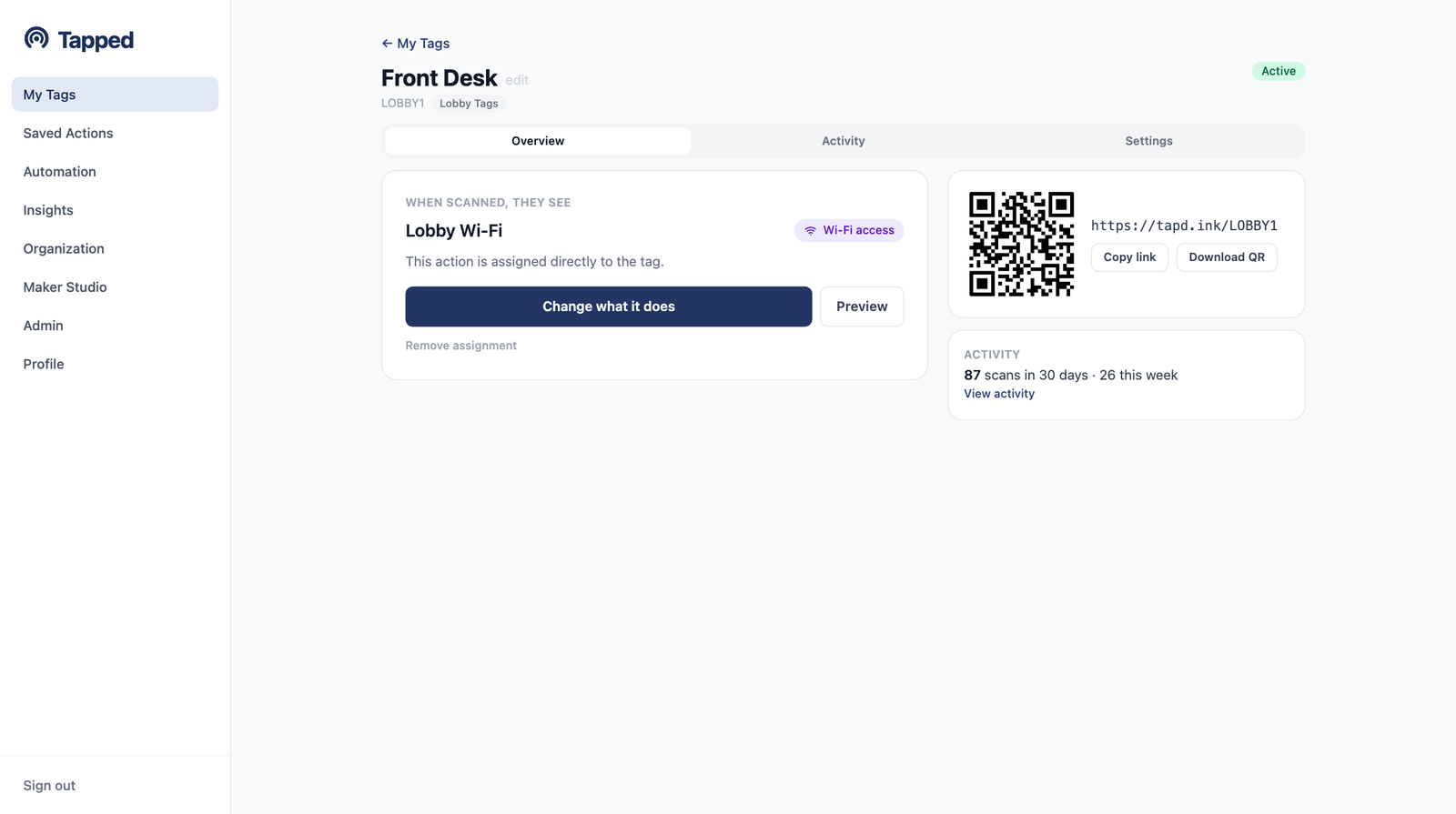
Your tag's page: what people see when they scan, its QR code, and live activity.
Pick one in the wizard now, switch to another whenever you like.
Hold your phone to the tag, follow the prompts, and the wizard handles the rest.